
Overview
Regroup’s Digital Signage integration, a premium add-on, allows you to publish RSS-based signage content. After enabling the add-on through Regroup, you can access the FourWinds Signage Integration Control File URL to integrate with your publishing systems. This file indicates when a new RSS message is ready for publishing by setting the emergency flag to ‘true.’
Access the Control File URL
After Regroup enables the Digital Signage add-on for your organization, you can access the control file from the Add-Ons page.
-
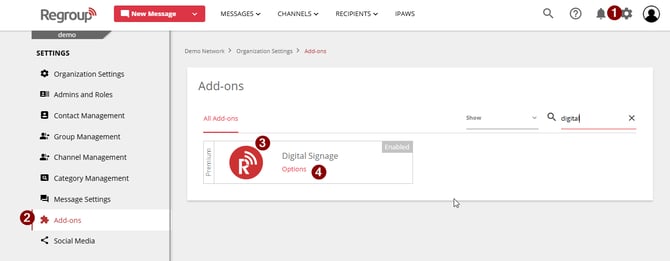
Click the Organization Settings icon in the top-right corner.
-
Select the Add-ons tab from the left navigation panel.
-
On the Add-ons page, locate the Digital Signage add-on by scrolling or searching.
-
Click Options on the Digital Signage add-on tile.
-
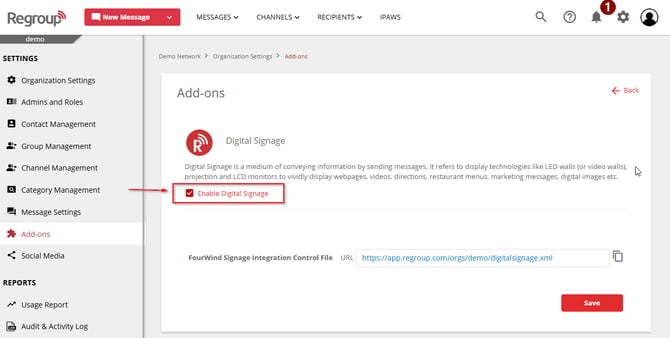
Verify the Enable Digital Signage checkbox is selected, confirming the add-on is active.
-
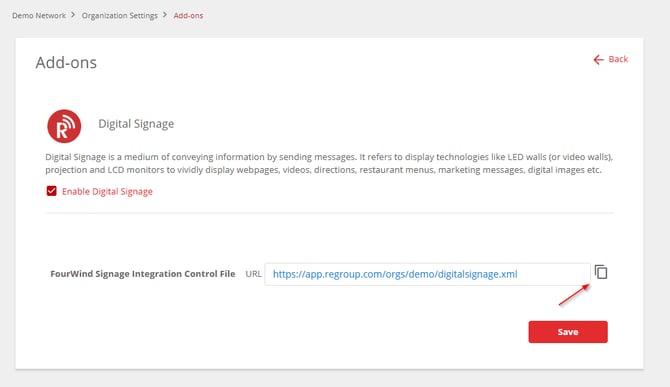
Copy or click the FourWinds Signage Integration Control File URL to monitor and publish live RSS messages.
Enabling or Disabling Digital Signage
How It Works
The control file includes a flag labeled emergency. When you send a digital signage (RSS) message from Regroup, this flag changes to true,
-
Signaling that a new message is ready for publishing. Your signage system can then publish the message from the channel’s RSS feed.
-
Toggle digital signage on/off per message in the Sent Messages section.
Managing Digital Signage in Channels
You can enable or disable digital signage for specific messages in the Sent Messages section of each channel. For more information, see the related topic: Turn Digital Signage On or Off.
Note: Disabling the add-on requires Regroup support to re-enable.