
To enable communication from Alertus to Regroup, you must enable and set up the API Access add-on. API Access is a premium add-on. Contact Regroup to enable it.
After you enable the API Access add-on, set it up for Alertus as follows:
-
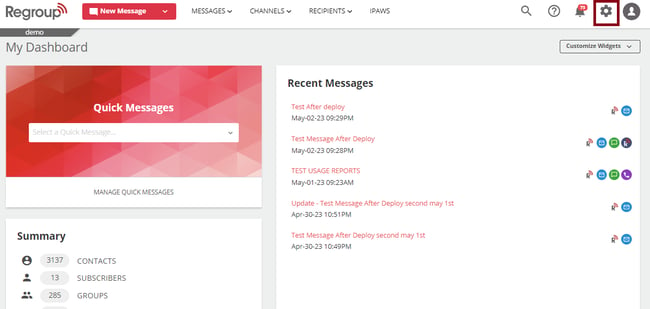
Click the Organization Settings icon on the top right corner. See the following image:
-
Click the Add-ons tab on the left navigation panel. See the following image:
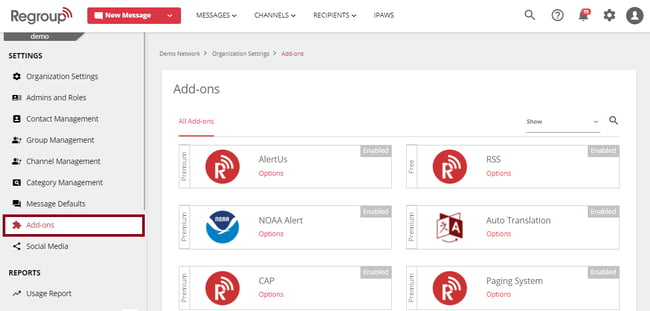
The add-ons page appears with all add-ons.
-
Search for API Access.
-
Click Options on the add-on tile. See the following image:
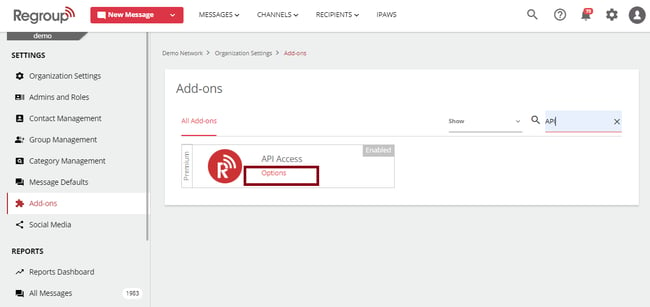
The Add-ons page opens.
-
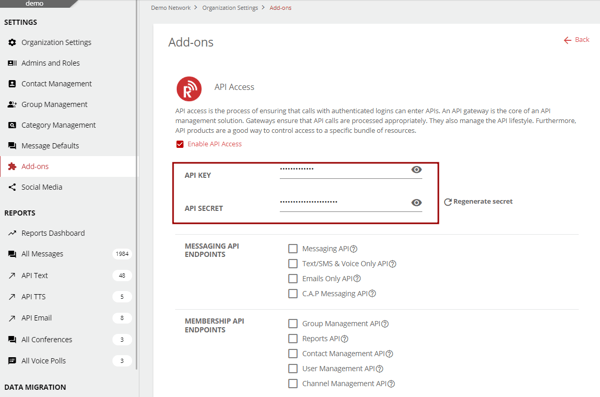
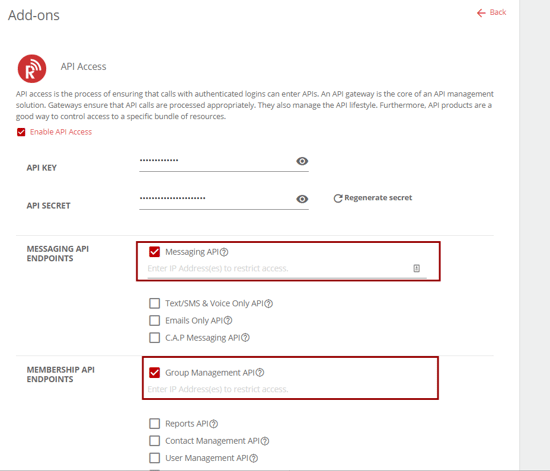
The Enable API Access check box appears enabled. If not enabled, click to enable.
Tip: You use the API Key and API Secret to input them in the AlertusMiddleware.impl.properties configuration file. This file is located on the Alertus Server in the conf directory of your Alertus installation.
See the following image:
-
In the Messaging API End Points field, click the Messaging API checkbox to enable it.
-
Click to enable the Group Management API checkbox in the Membership API End Points.
See the following image:
-
If required, enter the IP Address of your Alertus Server to restrict access to the Regroup Messaging API and Group Management API.
-
Click Save.