
The Incident Management Dashboard provides a centralized view of all active, closed, and scheduled incidents, as well as saved incident templates. It allows Incident Managers and Operators to monitor ongoing activity, access templates, and quickly launch or update incidents.
The Incident Management dashboard consists of the following sections:
-
Active Incidents
-
Closed Incidents
-
Scheduled Incidents
-
Incident Templates
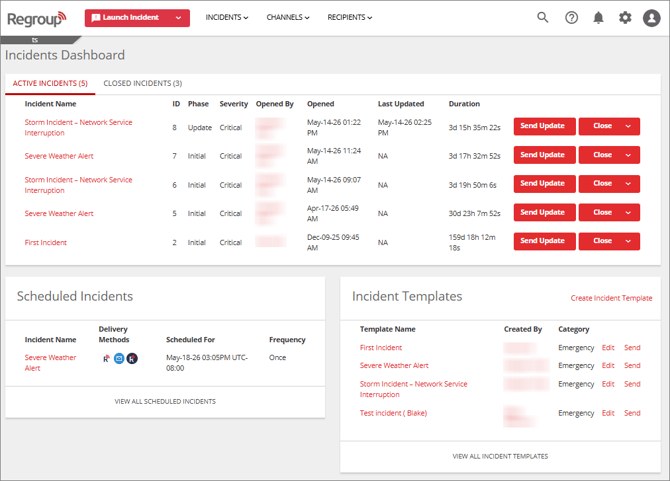
Active Incidents
This tab displays all currently open or ongoing incidents. It displays the following information for each active incident:
-
Incident Name: Title of the active incident.
-
ID: System-generated identifier for reference.
-
Phase: Current stage of the incident, such as Initial, Update, or Close.
-
Severity: Impact level of the incident, for example Critical, High, Medium, or Low.
-
Opened By: Name of the user who initiated the incident.
-
Opened: Date and time when incident was initiated.
-
Last Updated: Date and time of the most recent update made to the incident.
-
Duration: Total duration for which the incident has been active.
-
For active incident(s), you can perform the following on the Incidents Dashboard page:
-
Send an update for an active incident. See the Send Update For an Incident topic for additional information.
-
Close an active incident. See the Close an Incident topic for additional information.
-
Closed Incidents
This tab displays all closed incidents. It displays the following information for each closed incident:
-
Incident Name: Title of the closed incident.
-
ID: System-generated identifier for reference.
-
Severity: Impact level of the incident, for example Critical, High, Medium, or Low.
-
Opened By: Name of the user who initiated the incident.
-
Opened: Date and time when incident was initiated.
-
Last Updated: Date and time of the most recent update made to the incident.
-
Closed: Date and time when incident was closed.
-
Closed By: Name of the user who closed the incident.
-
Duration: Total time between the opening and closure of the incident.
Scheduled Incidents
This section displays incidents that are scheduled to be automatically launched at a specified date and time. It displays the following information for each scheduled incident:
-
Incident Name: Title of the scheduled incident.
-
Post Methods: Displays icons representing the delivery methods selected for the incident, such as Email, SMS, Voice, etc.
-
Scheduled For: Date and time when the incident is configured to be automatically launched.
-
Frequency: Indicates whether the incident is a one-time or recurring event.
See the Schedule an Incident topic for additional information.
Incident Templates
This section lists templates that can be used to launch new incidents. It displays the following information for each incident template:
-
Template Name: The name assigned to the template.
-
Created By: The user who created or last modified the template.
-
Category: The category assigned to the template.
See the Incident Templates topic for additional information.