
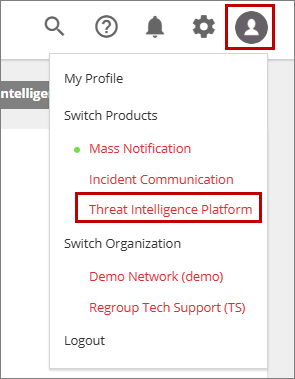
The Threat Intelligence Platform (TIP) must be enabled for your Regroup organization before you can access it. Once enabled, Threat Intelligence Platform is available under Switch Product in the profile menu in Regroup app.
TIP uses Regroup Single Sign-On (SSO) or Multi-Factor Authentication (MFA) for authentication, so you do not need to create or manage separate login credentials. After signing in to Regroup, you can access TIP directly from within the Regroup app without signing in again.
To access Threat Intelligence Platform:
-
Sign in to Regroup app using your credentials.
-
In the header menu, click the profile icon on the right side.
-
In the Profile menu, under Switch Products, click Threat Intelligence Platform.
You are redirected to the Threat Intelligence Platform (TIP), where the Dashboard page is displayed by default.